SlotWise – Intelligent College Timetable Scheduling System
Automatically generate clash-free college timetables using intelligent constraint optimization and scheduling algorithms.
Project overview
What this project is about.
SlotWise is an intelligent college timetable scheduling and management system designed to simplify one of the most challenging tasks in academic administration: preparing and maintaining college timetables.
Creating a college timetable manually can be complicated because multiple factors must be considered simultaneously, including teachers, subjects, classrooms, student divisions, laboratory sessions, and weekly teaching requirements. A small scheduling change can create conflicts across multiple classes, making the entire process time-consuming and difficult to manage.
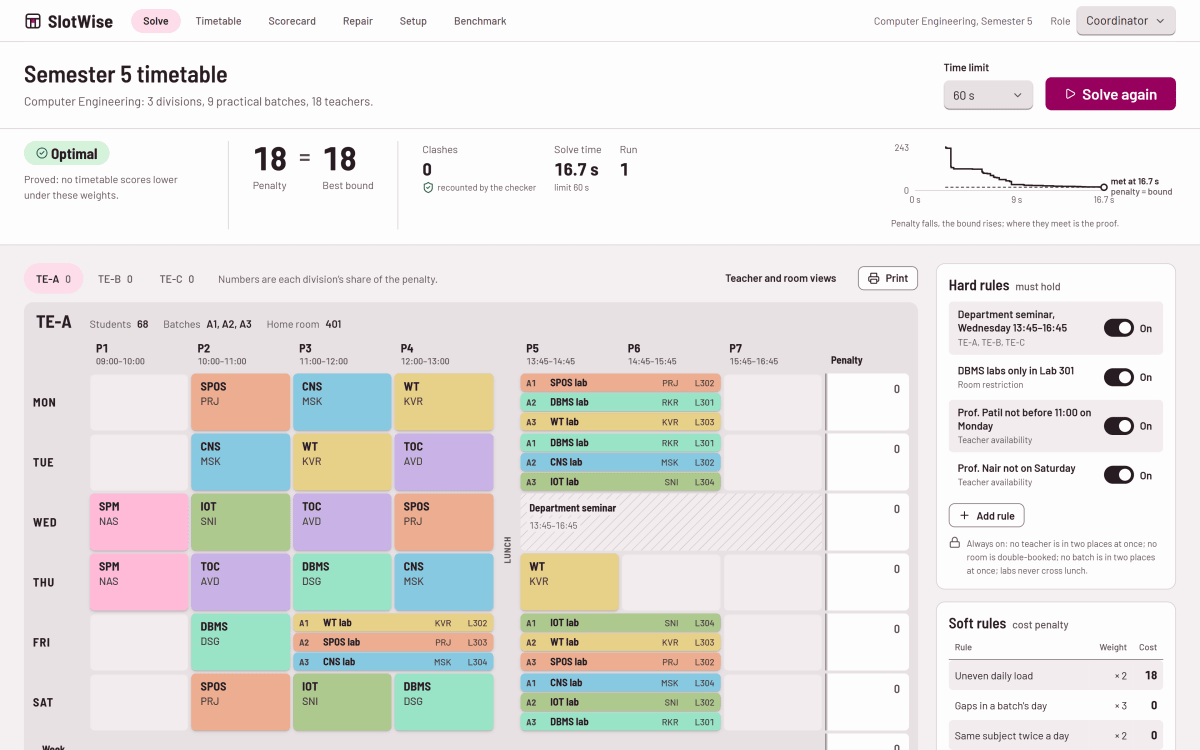
SlotWise addresses these challenges through automated timetable generation powered by Google's OR-Tools CP-SAT constraint optimization engine. Instead of manually assigning every lecture and laboratory session, coordinators can enter department information, configure scheduling rules, and let the system generate a suitable weekly timetable.
The system considers important scheduling constraints such as teacher availability, classroom availability, student batch conflicts, laboratory requirements, and teaching loads. It also supports soft constraints to improve timetable quality by reducing scheduling penalties and creating more balanced schedules.
One of the most valuable capabilities of SlotWise is its explainable scheduling approach. When a valid timetable cannot be generated, the system helps identify the constraints responsible for the scheduling problem. This makes it easier for coordinators to understand the issue and adjust the relevant rules.
SlotWise also introduces an intelligent timetable repair mechanism. For example, if a teacher becomes unavailable, coordinators do not necessarily need to generate an entirely new timetable. The system can attempt to repair the existing schedule while minimizing the number of changes to previously assigned sessions.
Additionally, the platform provides penalty scorecards and scheduling analytics to help users evaluate timetable quality and understand constraint violations.
The application features a modern React-based interface connected to a Python FastAPI backend. Its scheduling engine uses Google OR-Tools CP-SAT, while a Genetic Algorithm implementation is available as a comparison baseline for evaluating optimization approaches.
SlotWise demonstrates how constraint programming, optimization algorithms, backend development, and modern frontend technologies can be combined to solve a practical real-world problem in educational institutions.
Who it is for
Usage and use case
- Register and configure department scheduling information.
- Add classrooms, teachers, subjects, divisions, and student batches.
- Define weekly teaching requirements and scheduling constraints.
- Generate optimized weekly college timetables automatically.
- Review teacher, classroom, and student scheduling conflicts.
- Understand why timetable generation may fail through constraint explanations.
- Repair existing timetables when scheduling changes occur.
- Evaluate timetable quality using penalty scorecards and analytics.
- Compare CP-SAT optimization with a Genetic Algorithm baseline.
Built with
Technology stack
- Python
- FastAPI
- Google OR-Tools
- CP-SAT Solver
- Genetic Algorithm
- React.js
- TypeScript
- Vite
- SQLite
- SQLAlchemy
- Alembic
- TanStack Query
- Recharts
- CSS Modules
- Pytest
- Vitest
- Playwright
- uv
- npm
What you get
Key features
- Automated college timetable generation
- Constraint-based scheduling using Google OR-Tools CP-SAT
- Teacher availability and workload management
- Classroom and laboratory scheduling
- Student division and batch management
- Teacher scheduling conflict detection
- Classroom availability conflict detection
- Student batch clash prevention
- Weekly teaching-hour requirement management
- Hard and soft scheduling constraints
- Explainable timetable infeasibility analysis
- Automatic timetable repair with minimal changes
- Penalty scorecards and scheduling analytics
- Genetic Algorithm optimization comparison
- Interactive timetable visualization
- Department configuration wizard
- Role-based demonstration interface for coordinators, HODs, faculty, and students
- REST API integration using FastAPI
- Server-Sent Events for live scheduling progress
- Independent timetable validation and constraint checking
Before you start
Requirements
Python 3.11 or later
Node.js and npm
uv package manager
Git
Modern web browser (Chrome, Firefox, or Edge)
Minimum 4 GB RAM recommended
Internet connection for initial dependency installation
Project media
A closer look.
Optional extras
Boost your project
Optional extras to help you document, present and understand your work. Mention the ones you like when you enquire.
-
Popular Documentation support Submission-ready project report. - Full project report (PDF and Word)
- Setup guide and README
- Diagrams and screenshots
-
Presentation support Slides ready for your review. - Slide deck of 12 to 15 slides
- Speaker notes
- Demo walkthrough script
-
Publication support Guidance to turn it into a paper. - Paper structure and abstract
- Journal and format guidance
- Reference and plagiarism-check help
-
1:1 mentorship Live help from a mentor. - 45-minute video call
- Code walkthrough
- Viva question practice
How do I get a project?
Open the project you like and use the button on its page. If online payment is available you can pay and choose how you want to receive it. Otherwise send us a short enquiry and we will reply on WhatsApp or email.
Can a project be changed to fit my requirements?
Yes. Describe the changes you need when you enquire, and we confirm the scope and the price before any work starts.
Are add-ons available?
Many projects have optional add-ons such as documentation or presentation support. They are listed on the project page with their prices, and you can pick them when you buy or enquire.
How will I receive my order?
You choose email, WhatsApp or a Google Drive link. The delivery time is shown on the project page and in your confirmation email.
Is there a demo?
Projects with a demo video have a play button on their page. If you want to see something specific, ask us and we will tell you what we can show.
Can I get a refund?
Projects are digital, so payments are generally not refundable. If something went wrong, send a refund request with your order reference and we review it fairly. The Refund Policy explains the details.