Mehfil – Real-Time Synchronized Multi-Device Music Player
Synchronize music across multiple phones using one laptop, QR codes, and real-time audio timing technology.
Project overview
What this project is about.
Mehfil is a real-time synchronized multi-device music player that turns multiple smartphones into one coordinated sound system. Instead of relying on a single speaker, users can connect several phones and play the same song together, creating a shared music experience for college parties, small gatherings, and social events.
Imagine playing the same song on five phones. If each phone starts at a slightly different time, the music sounds like an echo. Mehfil addresses this problem by coordinating playback across connected devices using clock synchronization, scheduled playback, and continuous timing correction.
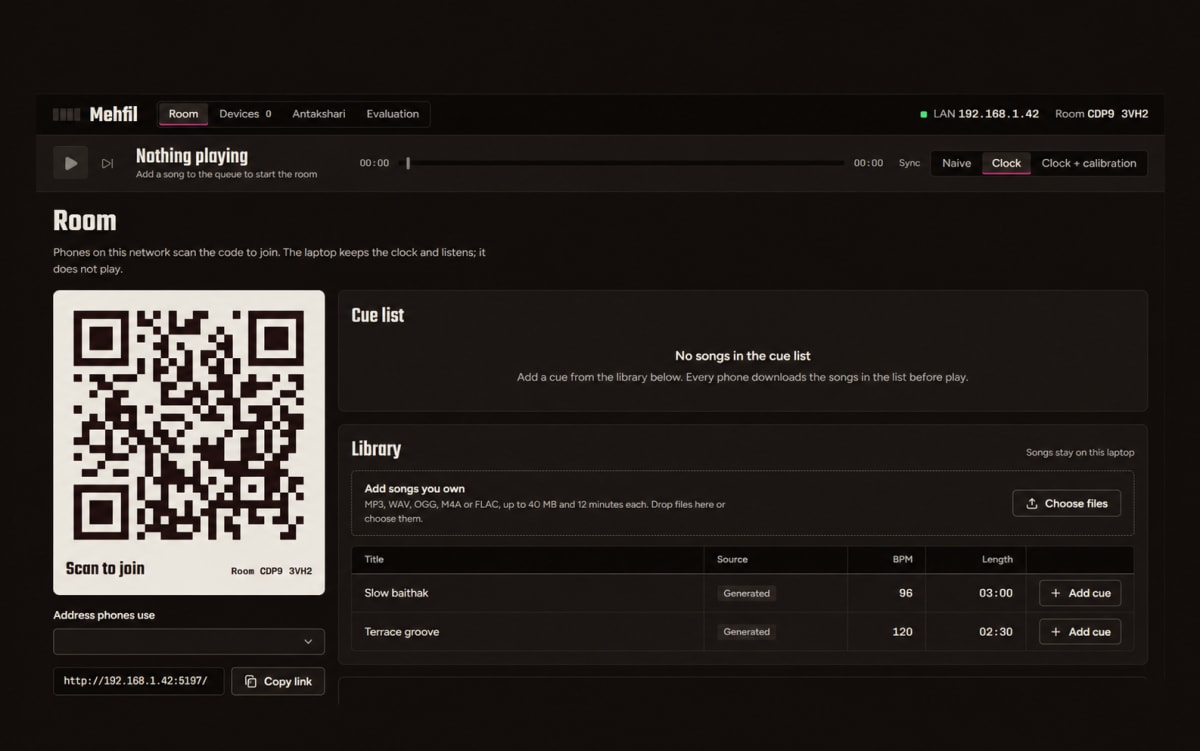
The application uses a laptop as the host and controller, while smartphones join the music room through a QR code using their web browsers. No dedicated mobile application or user account is required. The host can manage the music queue, upload audio files, select synchronization modes, and monitor the connected devices.
Mehfil uses a real-time communication system to exchange timing information between the host and connected phones. Each phone estimates how its clock differs from the server's clock. When playback begins, the server schedules a future start time rather than simply telling every phone to play immediately. This gives the devices time to prepare before playback starts.
The application also checks playback positions periodically and makes small timing adjustments to reduce synchronization drift. For more advanced synchronization, Mehfil provides speaker-delay calibration. A phone plays a short test sound, the laptop's microphone records it, and digital signal processing techniques help estimate the delay between the sound being played and received.
Mehfil includes an interactive Antakshari mode, where teams can play a music-based word game, and a Light Mode, where connected phones flash along with the beat. Its evaluation dashboard provides tools for measuring synchronization differences, comparing playback methods, and analyzing device timing.
The project combines full-stack web development, real-time communication, audio processing, distributed-system concepts, and interactive user interface design. It is suitable for students interested in understanding how independent devices can coordinate their actions over a network.
Who it is for
Usage and use case
- Start the Mehfil application on a laptop and create a music room.
- Connect the laptop and smartphones to the same local network.
- Open the room page and scan its QR code with each phone.
- Upload supported audio files or select available songs from the music library.
- Add songs to the playback queue and control playback from the host interface.
- Select a synchronization method: Naive, Clock Sync, or Clock + Calibration.
- Connect multiple phones and observe how playback is coordinated across devices.
- Use speaker calibration and the evaluation dashboard to explore timing differences.
- Try Light Mode for beat-synchronized visual effects or Antakshari for an interactive music game.
Built with
Technology stack
- TypeScript
- JavaScript
- Node.js
- React
- Vite
- Express.js
- Socket.IO
- WebSocket
- Web Audio API
- Digital Signal Processing (DSP)
- Fast Fourier Transform (FFT)
- Cross-Correlation
- Zod
- TanStack Query
- React Router
- Recharts
- Groq API
- Whisper Speech Recognition
- Vitest
- HTML5
- CSS3
What you get
Key features
- QR-code-based room joining without installing a mobile application
- Centralized music control through a laptop host
- Real-time communication between the host and connected smartphones
- Multi-device synchronized audio playback
- Naive, Clock Sync, and Clock + Calibration synchronization modes
- Clock-offset estimation using timestamped network communication
- Scheduled playback using a shared future start time
- Continuous playback monitoring and timing-drift correction
- Speaker-delay calibration using a laptop microphone
- Audio delay analysis using digital signal processing
- Music library with local audio file uploads
- Playback queue management and synchronized song controls
- Late-joining device support
- Beat-synchronized Light Mode
- Interactive Antakshari music game
- Real-time device status and timing visualizations
- Synchronization evaluation and comparison dashboard
- Network-based multi-device room management
- Responsive browser-based interface for laptops and smartphones
- Automated testing support for core application functionality
Before you start
Requirements
Node.js 24
npm
A modern web browser with Web Audio API support
A laptop or computer to host and control the music room
Two or more smartphones for multi-device testing
A shared local network or compatible Wi-Fi hotspot
A laptop microphone for speaker-delay calibration and evaluation
Supported audio files in MP3, WAV, OGG, M4A, or FLAC format
A code editor such as Visual Studio Code
Basic knowledge of JavaScript or TypeScript, React, and Node.js
Internet access for installing dependencies and optional Groq-based speech transcription
A Groq API key for the optional Antakshari speech-recognition functionality
Project media
A closer look.
Optional extras
Boost your project
Optional extras to help you document, present and understand your work. Mention the ones you like when you enquire.
-
Popular Documentation support Submission-ready project report. - Full project report (PDF and Word)
- Setup guide and README
- Diagrams and screenshots
-
Presentation support Slides ready for your review. - Slide deck of 12 to 15 slides
- Speaker notes
- Demo walkthrough script
-
Publication support Guidance to turn it into a paper. - Paper structure and abstract
- Journal and format guidance
- Reference and plagiarism-check help
-
1:1 mentorship Live help from a mentor. - 45-minute video call
- Code walkthrough
- Viva question practice
How do I get a project?
Open the project you like and use the button on its page. If online payment is available you can pay and choose how you want to receive it. Otherwise send us a short enquiry and we will reply on WhatsApp or email.
Can a project be changed to fit my requirements?
Yes. Describe the changes you need when you enquire, and we confirm the scope and the price before any work starts.
Are add-ons available?
Many projects have optional add-ons such as documentation or presentation support. They are listed on the project page with their prices, and you can pick them when you buy or enquire.
How will I receive my order?
You choose email, WhatsApp or a Google Drive link. The delivery time is shown on the project page and in your confirmation email.
Is there a demo?
Projects with a demo video have a play button on their page. If you want to see something specific, ask us and we will tell you what we can show.
Can I get a refund?
Projects are digital, so payments are generally not refundable. If something went wrong, send a refund request with your order reference and we review it fairly. The Refund Policy explains the details.