EduSense AI - Intelligent Student Performance Prediction & Academic Analytics System
AI-powered student performance prediction platform with ML insights, recommendations, dashboards, and academic reports.
Project overview
What this project is about.
EduSense AI is an intelligent student performance prediction and academic analytics system designed to help educational stakeholders understand and monitor student academic performance using machine learning and data-driven analytics.
The system uses a trained Linear Regression machine learning model to estimate a student's Performance Index based on academic and lifestyle-related factors including hours studied, previous scores, extracurricular activities, sleep hours, and sample question papers practiced.
EduSense AI provides separate role-based experiences for Administrators, Faculty, Students, and Parents. Administrators can manage users and view system-wide analytics, faculty can manage students and create predictions, students can view their own academic performance and generate predictions, and parents can monitor the performance of their linked children through a read-only portal.
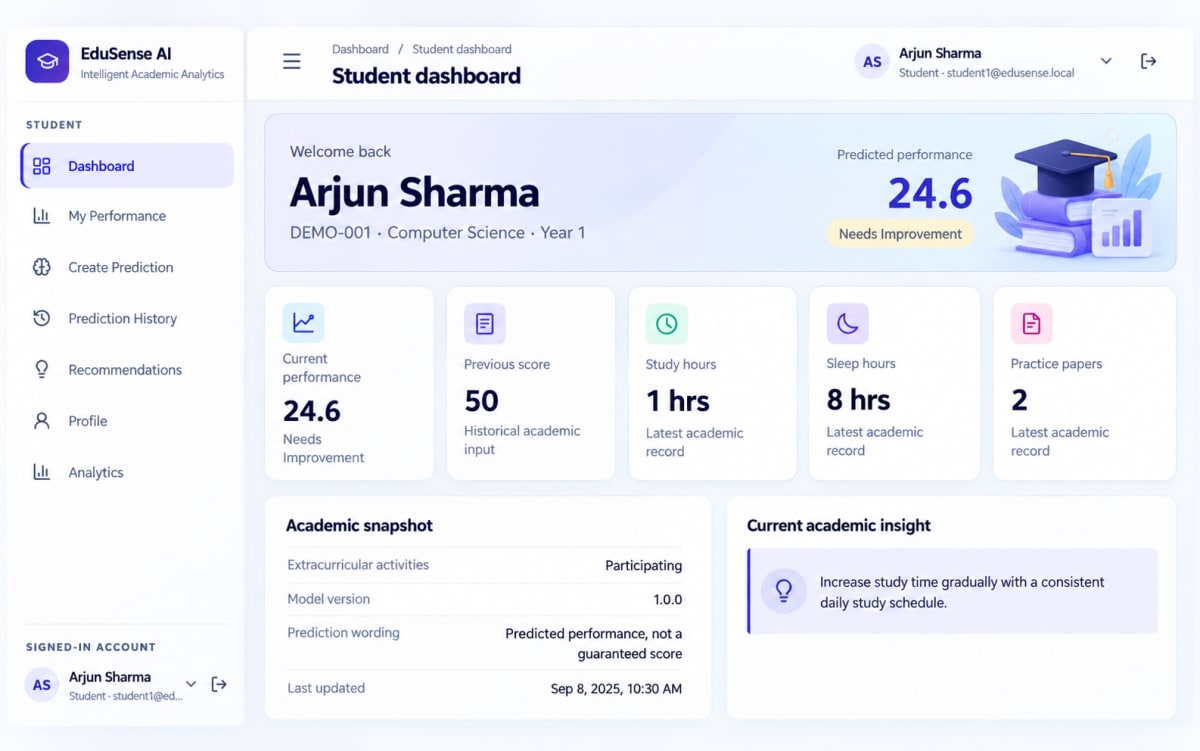
The application stores academic records and prediction results as historical data, allowing users to review prediction history and performance trends over time. It also provides analytics dashboards, academic insights, personalized recommendations, and downloadable PDF performance reports.
The machine learning prediction is performed on the backend using the saved trained model, while the React frontend provides the interactive user interface.
The project is designed as a final-year academic demonstration system and uses a synthetic/illustrative student performance dataset. Model performance is therefore dataset-specific and predictions should be treated as estimates rather than guaranteed future outcomes.
Who it is for
Usage and use case
- 1. Administrator logs into the system and manages users, students, faculty, parents, predictions, and system analytics.
- 2. Faculty logs in to view students, review academic information, create performance predictions, analyze student trends, and generate reports.
- 3. Students log in to view their dashboard, academic performance, prediction history, recommendations, and profile.
- 4. Students can enter academic factors and generate a machine learning based performance prediction.
- 5. Parents can log in to monitor the academic performance of their linked children.
- 6. Users can view prediction history and performance trends through interactive analytics.
- 7. The system generates academic insights and recommendations based on available student performance data.
- 8. Authorized users can generate and download PDF performance reports.
- 9. Administrators can use Django Admin to manage system data and review historical prediction records.
- 10. Developers can use the REST API and Swagger documentation to test and integrate system functionality.
Built with
Technology stack
- Python
- Django
- Django REST Framework
- React
- TypeScript
- Vite
- SQLite
- scikit-learn
- pandas
- NumPy
- joblib
- ReportLab
- Simple JWT
- Axios
- Recharts
- Lucide React
- React Router
- drf-spectacular
- HTML5
- CSS3
- REST API
- JWT Authentication
What you get
Key features
- Machine Learning Based Student Performance Prediction
- Linear Regression Performance Prediction Model
- Role-Based Access Control
- Admin Dashboard
- Faculty Dashboard
- Student Dashboard
- Parent Dashboard
- JWT Authentication
- Secure User Authentication
- Admin User Management
- Student Management
- Faculty Management
- Parent Management
- Parent-Student Relationship Management
- Academic Record Management
- Prediction Creation Workflow
- Historical Prediction Records
- Prediction History
- Student Performance Analytics
- Performance Distribution Analytics
- Department Performance Analytics
- Prediction Trend Analysis
- Student-Specific Analytics
- Academic Insights
- Personalized Recommendations
- Performance Category Classification
- PDF Performance Report Generation
- Django Administration Panel
- RESTful API
- Swagger API Documentation
- ReDoc API Documentation
- Responsive React User Interface
- Mobile-Friendly Dashboard
- Loading and Error States
- Form Validation
- Object-Level Authorization
- Parent-Child Data Authorization
- Historical Academic Data Preservation
- Demo Data Seeding
Before you start
Requirements
Windows 10/11 or compatible operating system
Python 3.13 or compatible Python version
Node.js 22.x or compatible Node.js version
npm
Visual Studio Code or any suitable code editor
Existing Python virtual environment
Python dependencies from backend/requirements.txt
Node dependencies from frontend/package.json
SQLite
Modern web browser
Minimum 4 GB RAM recommended
Internet connection required initially if dependencies need to be downloaded
Optional extras
Boost your project
Optional extras to help you document, present and understand your work. Mention the ones you like when you enquire.
-
Popular Documentation support Submission-ready project report. - Full project report (PDF and Word)
- Setup guide and README
- Diagrams and screenshots
-
Presentation support Slides ready for your review. - Slide deck of 12 to 15 slides
- Speaker notes
- Demo walkthrough script
-
Publication support Guidance to turn it into a paper. - Paper structure and abstract
- Journal and format guidance
- Reference and plagiarism-check help
-
1:1 mentorship Live help from a mentor. - 45-minute video call
- Code walkthrough
- Viva question practice
How do I get a project?
Open the project you like and use the button on its page. If online payment is available you can pay and choose how you want to receive it. Otherwise send us a short enquiry and we will reply on WhatsApp or email.
Can a project be changed to fit my requirements?
Yes. Describe the changes you need when you enquire, and we confirm the scope and the price before any work starts.
Are add-ons available?
Many projects have optional add-ons such as documentation or presentation support. They are listed on the project page with their prices, and you can pick them when you buy or enquire.
How will I receive my order?
You choose email, WhatsApp or a Google Drive link. The delivery time is shown on the project page and in your confirmation email.
Is there a demo?
Projects with a demo video have a play button on their page. If you want to see something specific, ask us and we will tell you what we can show.
Can I get a refund?
Projects are digital, so payments are generally not refundable. If something went wrong, send a refund request with your order reference and we review it fairly. The Refund Policy explains the details.