Converge – Real-Time Collaborative Whiteboard with Offline Synchronization
An offline-first collaborative whiteboard enabling real-time teamwork, conflict resolution, activity replay, and contribution tracking.
Project overview
What this project is about.
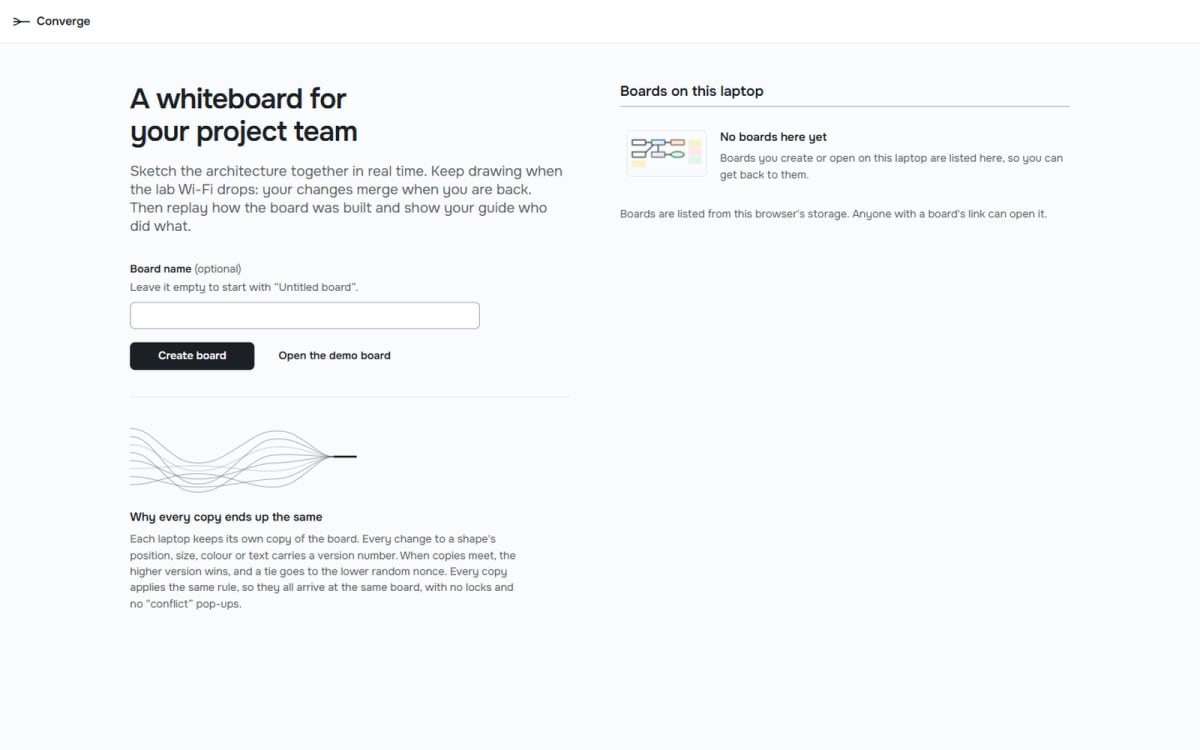
Converge is a modern, real-time collaborative whiteboard application designed to make teamwork easier, smarter, and more reliable. It allows multiple users to work together on a shared digital workspace, where they can draw diagrams, create flowcharts, add sticky notes, design system architectures, and organize project ideas simultaneously.
One of the biggest challenges in collaborative applications is handling multiple users editing the same content at the same time. When two or more users modify the same element, their changes can conflict, potentially resulting in overwritten or inconsistent data. Converge addresses this challenge using a custom implementation of CRDT (Conflict-Free Replicated Data Types).
CRDT is a distributed systems technique that allows multiple copies of shared data to synchronize and eventually reach an identical state, even when users make changes independently or experience network interruptions. Converge uses a per-property Last-Writer-Wins (LWW) conflict-resolution strategy, ensuring that concurrent updates are resolved consistently across participating users.
Another important capability is its offline-first architecture. Users can continue editing their whiteboards even when their internet connection is unavailable. Changes are stored locally in the browser using IndexedDB and synchronized with the server when connectivity is restored. This helps users continue their work without depending on a continuous internet connection.
Converge also provides an activity replay system that allows users to revisit the complete editing history, understand how a board evolved, and examine individual contributions. Its contribution reporting feature measures surviving work, surviving edits, and active time for each participant, making collaboration more transparent.
Additionally, the application includes an AI teammate that helps organize sticky notes into meaningful groups and labelled columns, making brainstorming sessions more structured.
Whether students are designing software architectures, planning final-year projects, or collaborating on technical diagrams, Converge provides a shared workspace where teamwork continues even when connectivity does not.
Who it is for
Usage and use case
- Create a collaborative whiteboard for individual or group projects.
- Invite teammates to join a shared workspace using a board link.
- Draw flowcharts, diagrams, shapes, and software architecture designs.
- Add sticky notes to organize tasks, ideas, and discussions.
- Collaborate with multiple users and observe their live cursors.
- Continue editing when offline and synchronize changes after reconnecting.
- Resolve concurrent modifications using CRDT-based conflict resolution.
- Replay previous activities to understand how the board was developed.
- Generate contribution reports to analyze individual participation.
- Use the AI teammate to organize sticky notes into labelled groups.
Built with
Technology stack
- React
- TypeScript
- Vite
- Node.js
- Express.js
- Socket.IO
- Canvas 2D
- perfect-freehand
- IndexedDB
- idb
- Zod
- TanStack Query
- React Router
- JSON
- NDJSON
- Vitest
- fast-check
- Anthropic API (optional AI integration)
What you get
Key features
- Real-time collaborative whiteboard
- Multiple users with live cursors
- Shared boards using invitation links
- Interactive drawing and diagram tools
- Sticky notes and text editing
- Offline-first editing architecture
- IndexedDB-based local persistence
- Automatic synchronization after reconnection
- Custom CRDT-based conflict resolution
- Per-property Last-Writer-Wins strategy
- Concurrent update merging
- Operation history and event logging
- Board snapshots and recovery
- Interactive activity replay
- Playback speed controls (1x, 4x, 16x)
- Participant-specific activity filtering
- Individual contribution reports
- Surviving work analysis
- Surviving edits tracking
- Active time measurement
- AI-powered sticky note organization
- Responsive web interface
- Automated testing and convergence evaluation
Before you start
Requirements
Node.js 24 or later
npm
Modern web browser (Chrome, Edge, or Firefox)
Stable internet connection for initial setup and real-time collaboration
Local network access for multi-device LAN demonstrations
Anthropic API key (optional, for live AI functionality)
Basic understanding of web application development is helpful but not mandatory.
Project media
A closer look.
Optional extras
Boost your project
Optional extras to help you document, present and understand your work. Mention the ones you like when you enquire.
-
Popular Documentation support Submission-ready project report. - Full project report (PDF and Word)
- Setup guide and README
- Diagrams and screenshots
-
Presentation support Slides ready for your review. - Slide deck of 12 to 15 slides
- Speaker notes
- Demo walkthrough script
-
Publication support Guidance to turn it into a paper. - Paper structure and abstract
- Journal and format guidance
- Reference and plagiarism-check help
-
1:1 mentorship Live help from a mentor. - 45-minute video call
- Code walkthrough
- Viva question practice
How do I get a project?
Open the project you like and use the button on its page. If online payment is available you can pay and choose how you want to receive it. Otherwise send us a short enquiry and we will reply on WhatsApp or email.
Can a project be changed to fit my requirements?
Yes. Describe the changes you need when you enquire, and we confirm the scope and the price before any work starts.
Are add-ons available?
Many projects have optional add-ons such as documentation or presentation support. They are listed on the project page with their prices, and you can pick them when you buy or enquire.
How will I receive my order?
You choose email, WhatsApp or a Google Drive link. The delivery time is shown on the project page and in your confirmation email.
Is there a demo?
Projects with a demo video have a play button on their page. If you want to see something specific, ask us and we will tell you what we can show.
Can I get a refund?
Projects are digital, so payments are generally not refundable. If something went wrong, send a refund request with your order reference and we review it fairly. The Refund Policy explains the details.