SeatRush – AI-Powered Railway Reservation & Concurrency Management System
A smart railway reservation simulator demonstrating high-traffic booking, fair queues, and AI-powered bot detection.
Project overview
What this project is about.
SeatRush is an AI-powered railway reservation simulation platform designed to demonstrate how booking systems handle thousands of users trying to reserve limited seats at the same time.
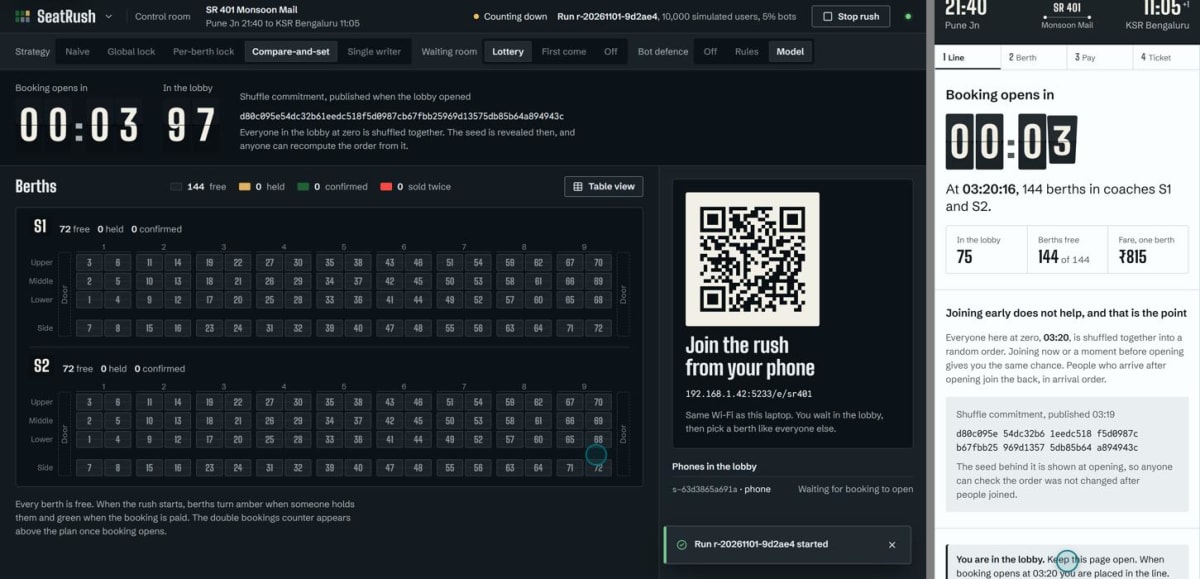
Imagine 10,000 users trying to book just 144 train seats simultaneously. Without proper management, this can lead to double bookings, booking failures, unfair seat allocation, and server overload.
SeatRush addresses these challenges through a smart waiting room, real-time seat availability, temporary seat locking, and multiple concurrency management strategies.
The platform allows users to enter a virtual booking system, wait for their turn, select available berths, enter passenger details, and complete a simulated payment process. Once a berth is selected, it is temporarily held to prevent other users from booking the same seat.
One of its interesting features is Machine Learning-based bot detection. It analyses simulated user behaviour, such as clicking patterns, request frequency, and interaction timing, to identify suspicious automated users.
SeatRush also includes a powerful control room where administrators can monitor booking activity, seat availability, waiting queues, bot detection, and double-booking incidents in real time.
The project supports five concurrency strategies: Naive, Global Lock, Per-Berth Lock, Compare-and-Swap (CAS), and Single Writer. These strategies can be compared using built-in simulations to understand how different approaches handle high-demand booking scenarios.
The platform also includes a rush simulator that can generate up to 10,000 virtual users, helping students evaluate system performance and understand real-world challenges in distributed and concurrent applications.
Note: SeatRush is an educational railway reservation simulation project. It does not connect to IRCTC or perform actual railway ticket bookings.
Who it is for
Usage and use case
- Start the backend server and frontend application.
- Open the SeatRush application in your browser.
- Explore the railway booking interface and view available trains.
- Join the virtual waiting room before booking opens.
- Select an available coach and berth.
- Enter passenger details and complete the simulated payment.
- View your booking confirmation and generated PNR.
- Open the control room to monitor booking activity and system performance.
- Run simulations with different concurrency strategies and compare their results.
- Explore the ML-based bot detection system and evaluation dashboard.
Built with
Technology stack
- React 19
- TypeScript
- Vite
- Python 3.12
- FastAPI
- SQLite
- WebSockets
- TanStack Query
- React Router
- CSS Modules
- Recharts
- Scikit-learn
- Hypothesis
- Pytest
- Vitest
- Playwright
- QR Code
What you get
Key features
- AI-powered bot detection
- Real-time seat availability
- Smart railway reservation simulation
- Fair virtual waiting room
- Lottery-based queue allocation
- First-come-first-served queue strategy
- Temporary 60-second seat locking
- Five concurrency management strategies
- Prevention and detection of double bookings
- Passenger details and simulated payment
- Booking confirmation with unique PNR
- Interactive railway coach and berth selection
- Rush simulation with up to 10,000 virtual users
- HTTP load testing with up to 1,000 clients
- Machine Learning-based suspicious user detection
- Real-time administrative control room
- Live booking and seat monitoring
- Performance comparison dashboard
- Booking event logging and recovery
- Interactive analytics and visualizations
Before you start
Requirements
Python 3.12 or above
Node.js and npm
Git
Visual Studio Code or any preferred code editor
Modern web browser (Chrome, Firefox, or Edge)
Minimum 8 GB RAM recommended
Internet connection for initial dependency installation
Required Python packages and Node.js dependencies
Environment variables configured as specified in the project setup guide
Project media
A closer look.
Optional extras
Boost your project
Optional extras to help you document, present and understand your work. Mention the ones you like when you enquire.
-
Popular Documentation support Submission-ready project report. - Full project report (PDF and Word)
- Setup guide and README
- Diagrams and screenshots
-
Presentation support Slides ready for your review. - Slide deck of 12 to 15 slides
- Speaker notes
- Demo walkthrough script
-
Publication support Guidance to turn it into a paper. - Paper structure and abstract
- Journal and format guidance
- Reference and plagiarism-check help
-
1:1 mentorship Live help from a mentor. - 45-minute video call
- Code walkthrough
- Viva question practice
How do I get a project?
Open the project you like and use the button on its page. If online payment is available you can pay and choose how you want to receive it. Otherwise send us a short enquiry and we will reply on WhatsApp or email.
Can a project be changed to fit my requirements?
Yes. Describe the changes you need when you enquire, and we confirm the scope and the price before any work starts.
Are add-ons available?
Many projects have optional add-ons such as documentation or presentation support. They are listed on the project page with their prices, and you can pick them when you buy or enquire.
How will I receive my order?
You choose email, WhatsApp or a Google Drive link. The delivery time is shown on the project page and in your confirmation email.
Is there a demo?
Projects with a demo video have a play button on their page. If you want to see something specific, ask us and we will tell you what we can show.
Can I get a refund?
Projects are digital, so payments are generally not refundable. If something went wrong, send a refund request with your order reference and we review it fairly. The Refund Policy explains the details.