StudyMind AI — An intelligent platform for personalized exam preparation.
AI-powered exam preparation platform that organizes notes, analyzes PYQs, and generates personalized practice papers intelligently.
Project overview
What this project is about.
StudyMind AI is an intelligent academic exam-preparation platform designed to help college students study more effectively.
Users can create subjects and upload their study materials as PDF files. The application processes these documents, extracts their text, and converts the content into searchable knowledge using artificial intelligence.
Students can ask questions through the AI Study Assistant. The system searches the uploaded notes and provides answers based on the relevant study material. Answers include document and page-level citations so students can verify the information easily.
StudyMind AI also allows users to upload Previous Year Question Papers, commonly called PYQs. The system extracts questions from these papers, identifies repeated topics, analyzes question frequency, studies marks distribution, and displays historical examination patterns.
Using the analyzed PYQ data, students can generate AI-powered model question papers. They can select the number of 2-mark, 5-mark, and 10-mark questions and create a structured practice paper.
The platform can also generate marks-aware answers for model-paper questions. Short questions receive concise answers, while higher-mark questions receive detailed explanations with important points, examples, and conclusions.
Generated model papers can be viewed online and downloaded as professional PDF documents.
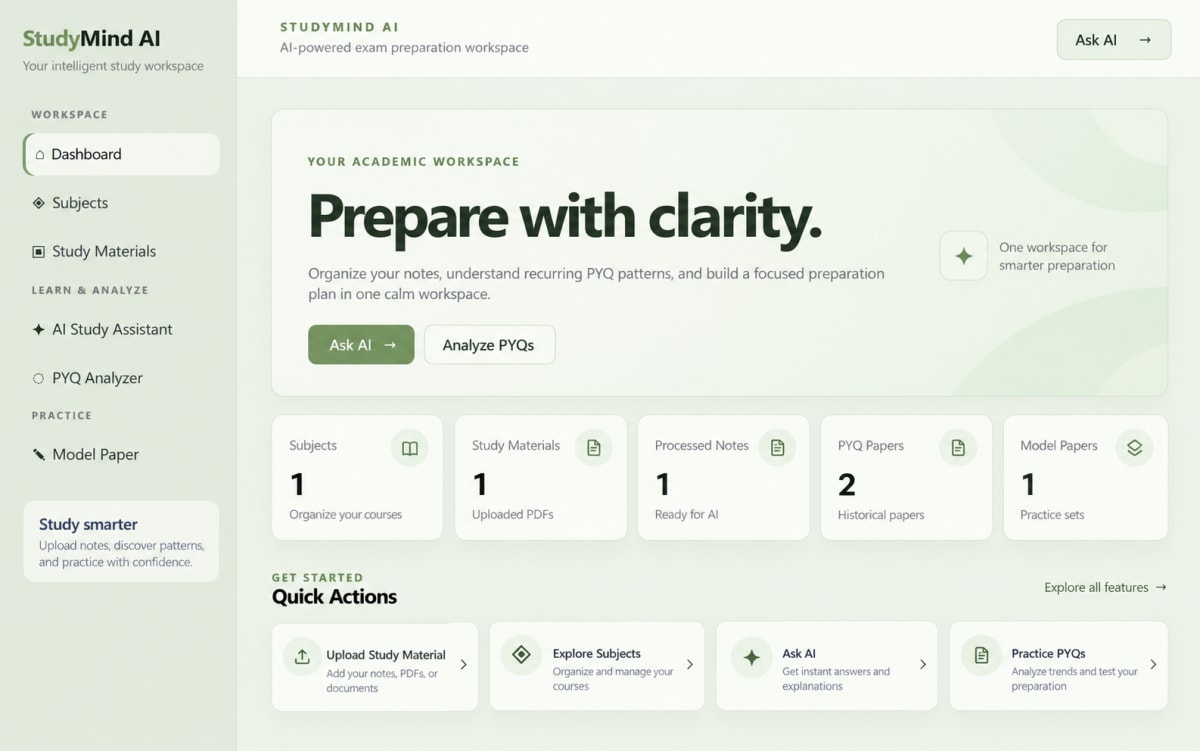
The application is designed with a clean, responsive, and professional academic interface. It includes a fixed navigation sidebar, dashboard statistics, subject management, study-material management, PYQ analysis, AI chat, model-paper generation, and PDF export.
StudyMind AI helps students organize their preparation, understand important historical question patterns, revise from their own notes, and practice with automatically generated examination material.
Who it is for
Usage and use case
- 1. Create a subject such as Operating Systems, Computer Networks, or Database Management Systems.
- 2. Upload study-material PDFs for the selected subject.
- 3. Process the uploaded study materials so the system can extract text and create searchable embeddings.
- 4. Open the AI Study Assistant and select a subject.
- 5. Ask questions about the uploaded notes. The AI provides answers with document and page citations.
- 6. Ask general academic questions. If the answer is not available in the uploaded notes, Groq generates a general academic response.
- 7. Upload Previous Year Question Papers from the PYQ Analyzer section.
- 8. Process the uploaded PYQ papers to extract questions and analyze their patterns.
- 9. Select a subject and load the PYQ analysis.
- 10. Review frequently repeated topics, question frequency, years, units, marks, and importance scores.
- 11. Open the Model Paper section and configure the required number of 2-mark, 5-mark, and 10-mark questions.
- 12. Generate a model question paper using historical PYQ patterns.
- 13. Generate marks-aware answers for individual model-paper questions.
- 14. Download the completed model paper as a PDF.
- 15. Use the dashboard to monitor subjects, study materials, processed notes, PYQ papers, and generated model papers.
Built with
Technology stack
- Python
- Django
- Django REST Framework
- HTML5
- CSS3
- JavaScript
- Django Templates
- SQLite
- python-dotenv
- PyMuPDF
- Sentence Transformers
- all-MiniLM-L6-v2
- ChromaDB
- Groq API
- scikit-learn
- Agglomerative Clustering
- ReportLab
- Chart.js
- PowerShell
- Git
What you get
Key features
- Subject management
- Study-material PDF upload
- PDF text extraction
- AI question answering from uploaded notes
- Page-level source citations
- PYQ upload and processing
- Repeated-topic and question-pattern analysis
- AI model-paper generation
- Marks-aware answer generation
- Model-paper PDF export
- Dashboard statistics
- Responsive academic user interface
Before you start
Requirements
Windows 10 or Windows 11
Python 3.10 or newer
Internet connection
Groq API key
At least 4 GB RAM
At least 2 GB free storage
Modern web browser
Python virtual environment
PDF study materials
Previous Year Question Paper PDFs
Optional extras
Boost your project
Optional extras to help you document, present and understand your work. Mention the ones you like when you enquire.
-
Popular Documentation support Submission-ready project report. - Full project report (PDF and Word)
- Setup guide and README
- Diagrams and screenshots
-
Presentation support Slides ready for your review. - Slide deck of 12 to 15 slides
- Speaker notes
- Demo walkthrough script
-
Publication support Guidance to turn it into a paper. - Paper structure and abstract
- Journal and format guidance
- Reference and plagiarism-check help
-
1:1 mentorship Live help from a mentor. - 45-minute video call
- Code walkthrough
- Viva question practice
How do I get a project?
Open the project you like and use the button on its page. If online payment is available you can pay and choose how you want to receive it. Otherwise send us a short enquiry and we will reply on WhatsApp or email.
Can a project be changed to fit my requirements?
Yes. Describe the changes you need when you enquire, and we confirm the scope and the price before any work starts.
Are add-ons available?
Many projects have optional add-ons such as documentation or presentation support. They are listed on the project page with their prices, and you can pick them when you buy or enquire.
How will I receive my order?
You choose email, WhatsApp or a Google Drive link. The delivery time is shown on the project page and in your confirmation email.
Is there a demo?
Projects with a demo video have a play button on their page. If you want to see something specific, ask us and we will tell you what we can show.
Can I get a refund?
Projects are digital, so payments are generally not refundable. If something went wrong, send a refund request with your order reference and we review it fairly. The Refund Policy explains the details.