TARA – AI-Powered Eye Tracking and Voice Assistant
An AI-powered accessibility assistant that enables hands-free computer interaction using eye tracking and voice commands.
Project overview
What this project is about.
TARA (Tracking-gaze And Responsive Assistant) is an AI-powered desktop application designed to make computer usage more accessible for people with disabilities that affect their motor control. It provides an alternative way to interact with a computer without depending entirely on a traditional mouse or keyboard.
The system combines eye-gaze estimation, voice recognition, computer vision, and desktop automation to help users interact with on-screen elements. For example, a user can look toward a button and say a command such as “Hey Tara, click Submit.” TARA analyses the user's gaze, processes the spoken command, examines the visible screen, and identifies the most likely target for the requested action.
TARA uses a webcam to estimate where the user is looking. A calibration process helps map eye movements to screen coordinates, while filtering techniques reduce unwanted cursor movement. Its speech-processing system recognises commands in English, Hindi, Marathi, and Telugu, allowing users to interact in supported languages.
The application also uses Optical Character Recognition (OCR) and computer vision to identify text, buttons, links, and other interface elements. Its target-selection system combines gaze information, spoken commands, and detected screen content to determine which element the user may intend to select.
TARA integrates Jev as an optional decision service to help evaluate potential targets, with a local scoring mechanism available as a fallback. Safety controls can request spoken confirmation before risky actions are executed, helping reduce unintended interactions.
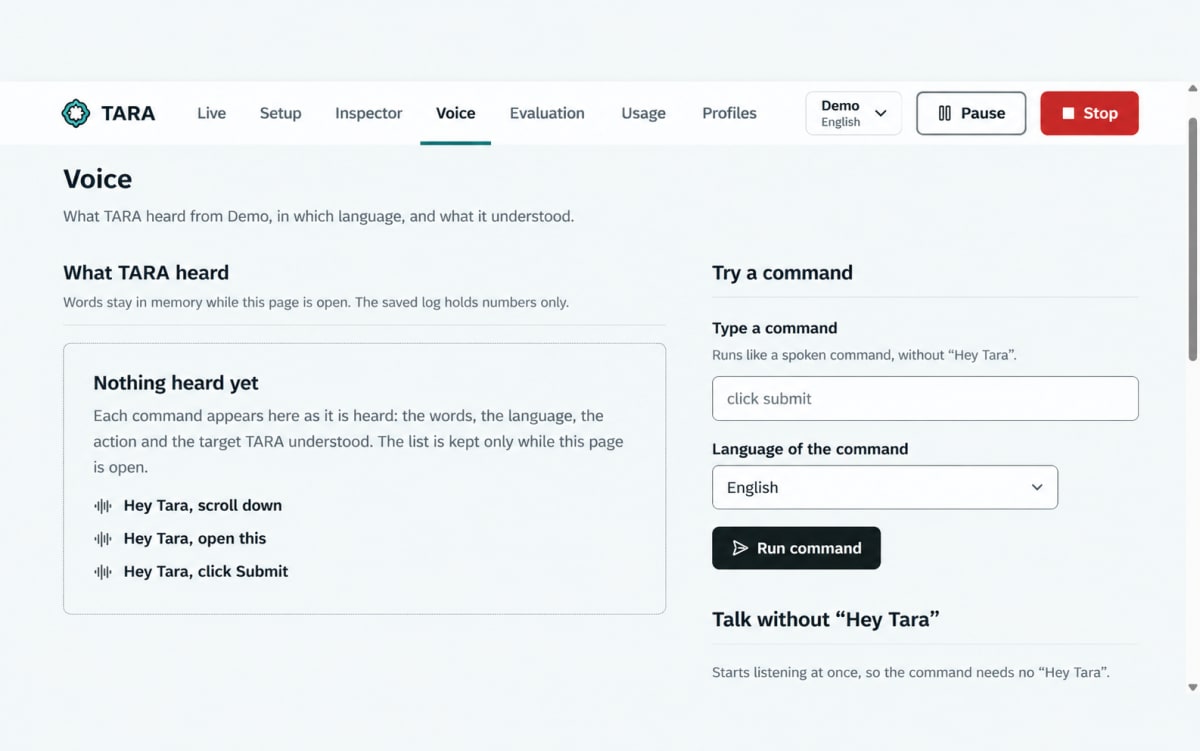
The project includes a desktop control panel for setup, camera calibration, voice commands, screen inspection, user profiles, usage statistics, and evaluation. It is designed with a focus on local processing and privacy, although optional external decision services may involve data leaving the device.
TARA is an excellent learning project for students interested in Artificial Intelligence, Computer Vision, Natural Language Processing, Human-Computer Interaction, and assistive technology. It demonstrates how multiple technologies can be integrated into a practical application that addresses a real-world accessibility challenge.
Who it is for
Usage and use case
- Install the required dependencies and download the supported AI models.
- Launch the TARA application and open its desktop control panel.
- Select a supported command language and configure the required device permissions.
- Complete camera setup and gaze calibration.
- Use voice commands and eye-gaze estimation to identify and interact with on-screen elements.
- Use the screen inspector to examine visible interface elements.
- Review target-selection results, safety confirmations, and usage statistics.
- Run the available evaluation tools to study system behaviour and identify areas for improvement.
Built with
Technology stack
- Python
- FastAPI
- React
- TypeScript
- MediaPipe
- OpenCV
- Whisper
- IndicConformer
- ONNX Runtime
- RapidOCR
- Jev decision service
- SQLite
- SQLAlchemy
- Alembic
- Remotion-independent desktop automation using pynput
- Playwright
- pytest
- Vitest
What you get
Key features
- AI-powered assistive desktop interaction
- Webcam-based eye-gaze estimation
- Camera calibration and gaze smoothing
- Multilingual voice command recognition
- English, Hindi, Marathi, and Telugu language support
- Wake-word detection using “Hey Tara”
- Screen understanding using OCR and computer vision
- On-screen button, link, and text detection
- Gaze-aware target selection
- Spoken-command and screen-element matching
- Optional Jev decision service integration
- Local target-scoring fallback
- Voice confirmation for risky actions
- Hands-free clicking, scrolling, and supported desktop actions
- Text-to-speech feedback
- Desktop overlay and control panel
- Setup wizard and device permission checks
- User profiles and configurable settings
- Usage statistics and response-time measurements
- Evaluation tools for testing system performance
- Local-first processing and privacy-focused data handling
Before you start
Requirements
Python 3.12
Node.js 24 or newer
uv package manager
Compatible Windows or macOS environment
Webcam
Microphone
Internet connection for initial dependency and model downloads
Sufficient disk space for AI models (approximately 2 GB according to the project documentation)
Compatible system permissions for camera, microphone, screen capture, and desktop interaction
Supported speech and text models downloaded and configured before use
Project media
A closer look.
Optional extras
Boost your project
Optional extras to help you document, present and understand your work. Mention the ones you like when you enquire.
-
Popular Documentation support Submission-ready project report. - Full project report (PDF and Word)
- Setup guide and README
- Diagrams and screenshots
-
Presentation support Slides ready for your review. - Slide deck of 12 to 15 slides
- Speaker notes
- Demo walkthrough script
-
Publication support Guidance to turn it into a paper. - Paper structure and abstract
- Journal and format guidance
- Reference and plagiarism-check help
-
1:1 mentorship Live help from a mentor. - 45-minute video call
- Code walkthrough
- Viva question practice
How do I get a project?
Open the project you like and use the button on its page. If online payment is available you can pay and choose how you want to receive it. Otherwise send us a short enquiry and we will reply on WhatsApp or email.
Can a project be changed to fit my requirements?
Yes. Describe the changes you need when you enquire, and we confirm the scope and the price before any work starts.
Are add-ons available?
Many projects have optional add-ons such as documentation or presentation support. They are listed on the project page with their prices, and you can pick them when you buy or enquire.
How will I receive my order?
You choose email, WhatsApp or a Google Drive link. The delivery time is shown on the project page and in your confirmation email.
Is there a demo?
Projects with a demo video have a play button on their page. If you want to see something specific, ask us and we will tell you what we can show.
Can I get a refund?
Projects are digital, so payments are generally not refundable. If something went wrong, send a refund request with your order reference and we review it fairly. The Refund Policy explains the details.