TrafficMind AI — Smart Traffic Analytics & Optimization
Upload traffic media, detect vehicles, estimate lane congestion, and simulate adaptive signal timings with YOLOv8.
Project overview
What this project is about.
TrafficMind AI is an AI-based traffic analysis and adaptive signal optimization system developed as an academic project. It helps users understand traffic conditions at road junctions by analyzing uploaded traffic images and videos.
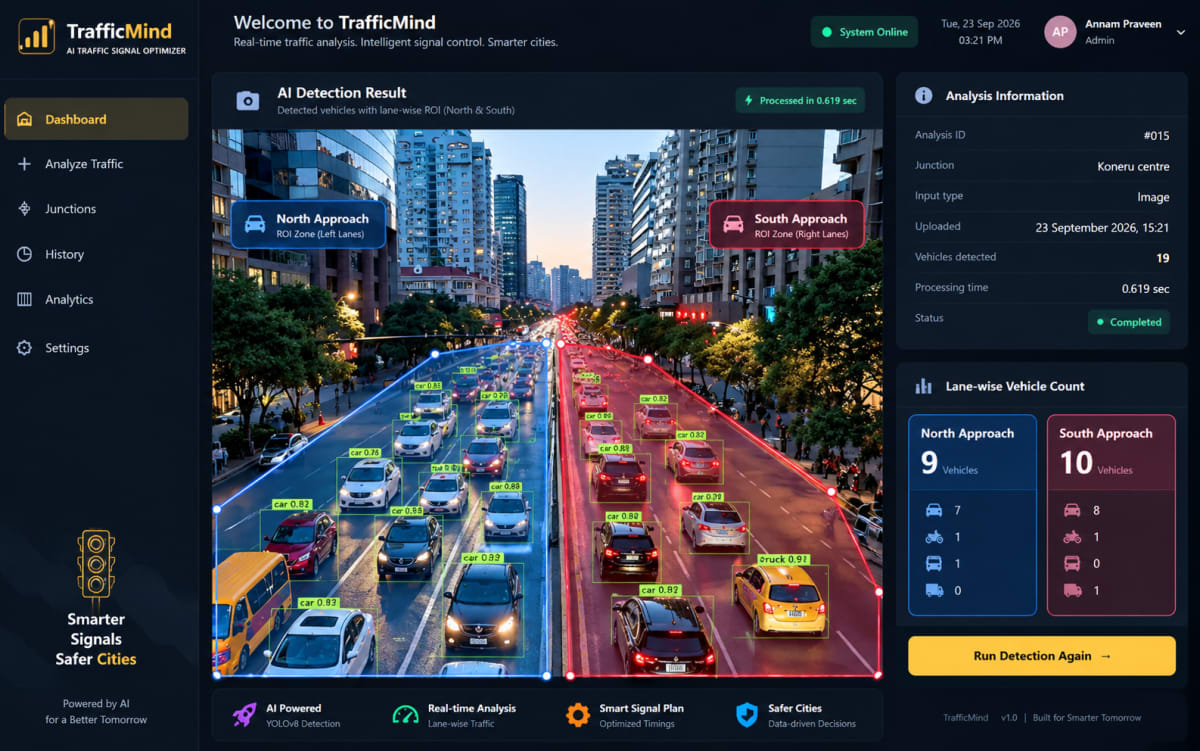
Users can create traffic junctions, add lanes, and configure a Region of Interest (ROI) for each lane. The ROI defines the area of the image that belongs to a particular lane. After uploading an image or video, the system uses a pretrained YOLOv8 model to detect vehicles such as cars, motorcycles, buses, and trucks.
The detected vehicles are analyzed and assigned to their respective lanes using the configured ROI boundaries. The system then calculates the number of vehicles in each lane and generates a weighted traffic score. Different vehicle types have different weights because buses and trucks generally occupy more road space than motorcycles and cars.
Based on the traffic score, each lane is classified into a traffic density level such as Low, Medium, High, or Very High. The system also calculates lane priority by comparing the traffic demand of each lane within the same junction. This helps identify which lanes require more green signal time.
TrafficMind AI uses this information to generate a simulated adaptive traffic signal plan. The plan recommends green, yellow, and red durations for each lane according to the detected traffic demand. The signal optimization is only a software simulation for academic demonstration and does not control real traffic lights, physical devices, CCTV cameras, or road infrastructure.
The project includes a web-based dashboard where users can view total vehicles, lane traffic scores, density levels, priority lanes, recent analyses, junction summaries, and simulated signal cycles. Separate analytics and history pages allow users to review traffic trends and previously processed analyses.
TrafficMind AI also provides a versioned REST API using Django REST Framework. Authenticated users can retrieve junction information, lane data, analysis results, lane-level traffic intelligence, and simulated signal plans. The API also supports triggering the existing image or video processing workflow.
This project is designed for beginners and academic users who want to understand how computer vision, traffic analysis, database systems, and web applications can work together. It uses manually configured lane ROIs and a pretrained YOLOv8 model instead of custom model training.
TrafficMind AI is an upload-based academic demonstration system. It does not support live CCTV streaming, real-time traffic monitoring, physical traffic signal control, IoT hardware, automatic lane detection, vehicle tracking, or unique vehicle counting. Video results are based on sampled frames, and the traffic weights and signal timing values are configurable demonstration parameters rather than certified traffic-engineering values.
Who it is for
Usage and use case
- Usage:
- 1. Create a traffic junction.
- 2. Add and configure lanes.
- 3. Define lane ROI regions.
- 4. Upload a traffic image or video.
- 5. Run vehicle detection.
- 6. Review lane traffic and congestion results.
- 7. Generate a simulated signal plan.
- 8. View results through the dashboard, analytics pages, or API.
Built with
Technology stack
- Python
- Django
- Django REST Framework
- SQLite
- YOLOv8
- Ultralytics
- OpenCV
- HTML
- CSS
- JavaScript
What you get
Key features
- Upload traffic images and videos
- YOLOv8 vehicle detection
- Detection of cars, motorcycles, buses, and trucks
- Manual lane ROI configuration
- Lane-wise vehicle counting
- Traffic score calculation
- Traffic density classification
- Priority lane identification
- Simulated adaptive signal timing
- Dashboard and analytics views
- Analysis history tracking
- REST API with token authentication
Before you start
Requirements
Python 3.13 or compatible Python version
Virtual environment
Django 5.2
Django REST Framework
Ultralytics YOLOv8
OpenCV
SQLite
A pretrained YOLOv8 model
Traffic image or video samples
Modern web browser
Optional extras
Boost your project
Optional extras to help you document, present and understand your work. Mention the ones you like when you enquire.
-
Popular Documentation support Submission-ready project report. - Full project report (PDF and Word)
- Setup guide and README
- Diagrams and screenshots
-
Presentation support Slides ready for your review. - Slide deck of 12 to 15 slides
- Speaker notes
- Demo walkthrough script
-
Publication support Guidance to turn it into a paper. - Paper structure and abstract
- Journal and format guidance
- Reference and plagiarism-check help
-
1:1 mentorship Live help from a mentor. - 45-minute video call
- Code walkthrough
- Viva question practice
How do I get a project?
Open the project you like and use the button on its page. If online payment is available you can pay and choose how you want to receive it. Otherwise send us a short enquiry and we will reply on WhatsApp or email.
Can a project be changed to fit my requirements?
Yes. Describe the changes you need when you enquire, and we confirm the scope and the price before any work starts.
Are add-ons available?
Many projects have optional add-ons such as documentation or presentation support. They are listed on the project page with their prices, and you can pick them when you buy or enquire.
How will I receive my order?
You choose email, WhatsApp or a Google Drive link. The delivery time is shown on the project page and in your confirmation email.
Is there a demo?
Projects with a demo video have a play button on their page. If you want to see something specific, ask us and we will tell you what we can show.
Can I get a refund?
Projects are digital, so payments are generally not refundable. If something went wrong, send a refund request with your order reference and we review it fairly. The Refund Policy explains the details.